How to Make One Wishlist for Multiple Stores
Make one wishlist for multiple stores. Learn how to save product links, organize your finds, and share everything you want with one Snag Mode profile.
The boots are on one website. The lamp is on another. The wildly unnecessary bag charm is somewhere in your screenshots.
Keeping track of everything you want shouldn’t require a search party.
To make one wishlist for multiple stores, use a universal wishlist: a place to collect product links from different retailers, organize your finds, and share them together. Instead of sending someone six separate store wishlists, you can send one destination.
Here’s how to build one you’ll actually keep using.
What is a universal wishlist?
A universal wishlist brings products from different stores into one place. A retailer’s wishlist stays inside that retailer’s website; a universal list follows you across shops.
That means a jacket from an independent designer, headphones from an electronics store, and a mug from a tiny ceramics studio can all belong in the same wishlist.
You can use it for birthday ideas, holiday gifts, a room makeover, or the things you’re considering buying yourself. Saving something doesn’t have to mean buying it. Sometimes you just want to remember that it exists.
How to make a wishlist for multiple stores
1. Choose one home for your finds
Start with a tool that accepts links from different retailers. The most useful setup is one you’ll remember to use whenever you spot something.
Look for:
- A straightforward way to add product URLs.
- Images that help you recognize what you saved.
- Collections for grouping related finds.
- A shareable destination for friends and family.
On Snag Mode, you can paste product links to build a wishlist and personal taste profile. You’ll need to sign in to save your finds.
2. Copy the link to the exact product
Open the product page and copy its URL.
Use the item’s own page rather than a store homepage, search result, or shopping cart. A direct link makes it easier to return to the right thing later.
Before copying, select your preferred size, color, or version. Then check whether those choices remain selected when you reopen the link. Some stores include variants in their URLs; others don’t.
If the link doesn’t preserve your selection, keep those details alongside the wishlist wherever you’ll see them. “The green one, size medium” is much more useful than “you know the one.”
3. Add it to your wishlist
Paste the product link into your chosen wishlist tool and check the result.
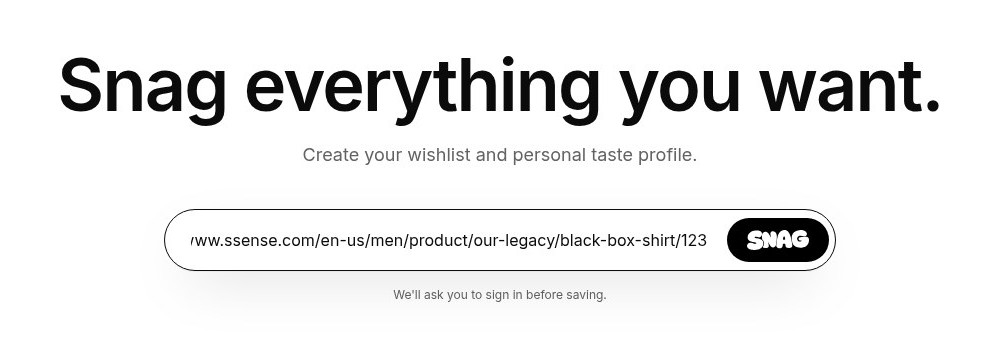
Make sure the saved item points to the right product. If product details populate automatically, review the image, name, and price rather than assuming everything imported perfectly.
Repeat with products from other stores. You don’t need to finish the whole list in one sitting: start with a few things you already know you want, then add new finds as you browse.
Moving an existing wishlist? Work through your store lists and open tabs one at a time, copying the products you still care about. It’s also a useful moment to retire the things you wanted three personalities ago.
4. Organize by how you’ll use the list
One destination doesn’t have to mean one enormous pile.
Group products around a purpose, occasion, or budget so they’re easier to browse. For example:
| Collection | What goes in it |
|---|---|
| Birthday ideas | Things you’d be excited to receive |
| Under $50 | Smaller gifts and affordable finds |
| Apartment upgrade | Lighting, furniture, and home accessories |
| Wardrobe shortlist | Pieces you’re considering together |
| If money was fake | The aspirational section |
Snag Mode supports collections within your profile, so your finds can stay connected while still having some structure.
Start with two or three useful groups. You can always add more when you have enough products to justify them.
5. Share one destination
When someone asks what you want, send them the place where you’ve already collected your ideas.
Snag Mode’s public profile works as a shareable wishlist, bringing your saved products into one destination.
Before sharing, look through it with the recipient in mind:
- Are there options at different prices?
- Can they tell which version you want?
- Are the links still working?
- Is everything visible something you’re comfortable sharing?
If you’re using the list for gifts, explain which collection they should browse. A little direction helps when your everyday saves include both birthday possibilities and a $4,000 chair.
6. Keep it useful
A wishlist works best when it reflects what you want now.
Before a birthday, holiday, or shopping trip, take a few minutes to review it. Remove things you’ve bought or received, check your favorites are still available, and reconsider anything that no longer feels like you.
Always confirm the current price, size, availability, and shipping details on the retailer’s product page before buying.
Can you buy everything from one checkout?
A multi-store wishlist collects your choices in one place. It doesn’t necessarily combine the purchases.
For a link-based wishlist, expect to visit the original retailers to buy the items. If your list includes products from three shops, you may have three separate orders, shipping charges, and return policies.
That’s especially useful to remember when sharing gift ideas internationally. A product can be easy to save but expensive—or unavailable—to ship to someone’s location.
Can a shared wishlist prevent duplicate gifts?
Sharing a list and coordinating purchases are different features.
If several people will shop from the same wishlist, check whether your chosen service supports private reservations or gift claiming.
Snag Mode supports sharing what you want, but its published feature guides currently list private gift claiming as planned. If avoiding duplicates is essential, use a wishlist with active reservation tools or coordinate purchases separately.
For a closer look at that distinction, read Giftful vs Snag Mode.
What makes a multi-store wishlist worth keeping?
The best habit is to save the link when you find the product.
Not later, when you’re trying to remember whether the shop had “studio” in its name. Not after the tab disappears. Right then.
A few other things help:
Save direct product links. They’re easier to act on than screenshots with no store name.
Keep your shortlist manageable. You can collect broadly, then narrow things down before sharing or buying.
Include different budgets. A useful gift list gives people room to choose.
Let your taste be specific. The unusual finds are often the reason you wanted a multi-store wishlist in the first place.
Frequently asked questions
Can I make one wishlist from different websites?
Yes. A universal wishlist lets you gather product links from different retail websites into one destination. Check individual saved items, because automatic product imports can vary by store.
Do I have to move my existing store wishlists?
You can start with a few favorite items instead of moving everything. Open each product you want to keep, copy its link, and add it to your universal wishlist.
Can I make a wishlist without a dedicated app?
Yes. A document or spreadsheet can hold product names, links, and notes. A dedicated wishlist can make a visual collection easier to browse and share.
Can I use one wishlist for gifts and personal shopping?
Yes. Separate collections can help distinguish gift ideas from purchases you’re considering yourself. Give each collection a clear name so people know where to look.
Give your wishlist one home
Your taste probably doesn’t fit inside one store. Your wishlist shouldn’t have to.
Start with the next three things you want to remember. Save their links, put them together, and keep adding as you find things worth keeping.
Start your wishlist on Snag Mode →
Related reading: 10 Best Universal Wishlist Apps · How to Make a Universal Holiday Wishlist
Start your own stash
Save products from any store, build a profile that looks like your taste, and share only what you mean to share.